Patrol Compton Patch Notes & Update Tracker
Game pass themes, traffic systems, availability reminders, and where official Compton patch news lands first.
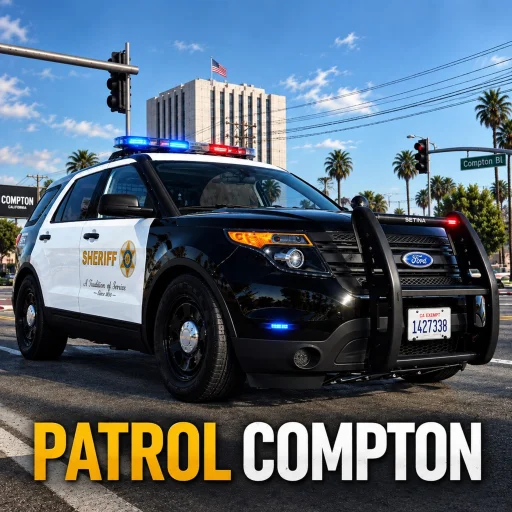
Stay current on Patrol Compton updates without refreshing random rumor posts. This hub summarizes recurring patch themes for TK Interactive’s Roblox police roleplay simulator, highlights game-pass directions (including CST and detective/deceptive-style unlocks), notes AI traffic behavior, and reminds players to verify live availability after moderation events.
Primary announcement channels remain the game Discord, the TK Interactive group, and the Roblox experience page. When those sources disagree with an old wiki paragraph, trust the live build.
Recent update themes players should expect
Community update reviews and shift videos keep circling the same improvement buckets:
- Vehicle and pursuit feel — Expedition Pursuit and related units receive handling attention so patrol-to-chase transitions feel intentional.
- Game pass showcase — CST (Crime Suppression Team) and detective/deceptive-style passes get storefront and gameplay spotlighting after content drops.
- Call and duty flow polish — clock-in, gear prompts, call board clarity, and booking reliability decide whether a shift feels premium.
- Traffic systems — radar usefulness and AI civilian presence (especially in private/solo configurations) remain talking points.
- Role identity — LASD-flavored marked presence versus specialty suppression or investigative fantasies.
- Stability passes — bug fixes after busy weekends on 20-player servers.
Use the embedded update/game-pass review video on this page as a visual companion, then confirm whether those pass perks still match the current store.
Game passes worth tracking
| Pass direction | Why officers care | Wiki follow-ups |
|---|---|---|
| CST | Suppression vehicles/kits for high-tempo RP | Tier List, Players |
| Detective / deceptive style | Lower-profile investigative tools | Players, Guides |
| Future cosmetic / QoL passes | Convenience, not a skill replacement | Re-check Discord store notes |
Passes amplify fantasy; they do not replace handcuffs, taser, or booking XP. New officers should finish Getting Started before spending Robux.
AI traffic note
Traffic enforcement fans often ask why civilian AI density differs between sessions. Community answers consistently point to private/solo server setups (including play-mode choices when joining) for stronger AI traffic and pursuit practice. Public servers still support player-driven stops and roleplay—radar discipline around the roughly 30–35 map speed context remains useful either way. Details and stop technique live in Traffic Enforcement.
Availability and moderation note (November 2026)
Patrol Compton has experienced Roblox moderation / temporary unavailability. Creator comments and player reports in early November 2026 described the experience as taken down or unavailable to join, with community hopes it would return. Some social posts also float unverified relaunch or rebrand rumors—treat those as unconfirmed until TK Interactive or the official Roblox page says otherwise.
This wiki documents mechanics as they work when the experience is online. Before you plan a long promotion grind:
- Open the official Roblox page and confirm you can join.
- Skim Discord (discord.gg/fDkUSjkXy) for “down,” “review,” or “back up” messages.
- Avoid third-party “we fixed the game” download scams.
- Resume clock-in drills only after a successful join.
Outages do not erase your need for gear order or arrest fundamentals—they just pause practice. When servers return, re-walk Getting Started and Controls before specialty CST shifts.
Where to read patch notes first
- Discord — discord.gg/fDkUSjkXy
- TK Interactive group shouts — community 63551330
- In-game banners / changelogs after you clock in
- Creator update videos (like the pass review linked here)
- This Updates Hub for summarized themes and deep links
Also watch Codes after celebratory patches—promo strings sometimes appear with milestones, though none are verified active as of November 2026.
After every major patch — officer checklist
- Re-test clock-in and on-duty status
- Confirm handcuffs and taser still equip from the usual rack
- Spawn Expedition Pursuit (or your CST/detective unit) and check handling
- Take one low-stakes call before stacking emergencies
- Book a practice arrest so station prompts still function
- Skim Scripts reality: old loadstrings break first after updates
- Update your personal notes on ranks if exams changed (Players)
Related reading
- Guides Hub — mechanics tutorials mapped to the live loop
- Getting Started — rebuild muscle memory after downtime
- How to Arrest — verify cuff flow post-patch
- Emergency Calls — call board changes show up here first in play
- Tier List — re-rank vehicles when new units ship
- Wiki overview — evergreen game summary
Updates should make Compton sharper, not stranger. When something feels off, isolate one system (gear, calls, booking), test it, then report clear reproduction steps in Discord instead of installing a “fix” executor pack.
Frequently Asked Questions
Quick answers to the most common Patrol Compton questions.
Where are official Patrol Compton patch notes posted?
Start with the game Discord (discord.gg/fDkUSjkXy) and the TK Interactive Roblox group. In-game banners and creator videos help, but Discord is the fastest signal.
What game passes do updates usually highlight?
CST (Crime Suppression Team) and detective/deceptive-style passes appear often in update and store reviews. Always confirm current perks in the live Roblox store.
Why do I see more AI traffic on some servers?
Players report denser AI traffic mainly on private/solo servers with the appropriate play mode. Public servers rely more on human civilians and officers.
The game will not open—did an update break it?
It may be a temporary Roblox moderation or platform outage rather than your client. Check the official experience page and Discord before troubleshooting installs.
Do updates add promo codes?
Sometimes games drop codes with milestones, but this wiki has no verified active Patrol Compton codes as of November 2026. Watch Discord, then see the Codes Hub.